
 8 min read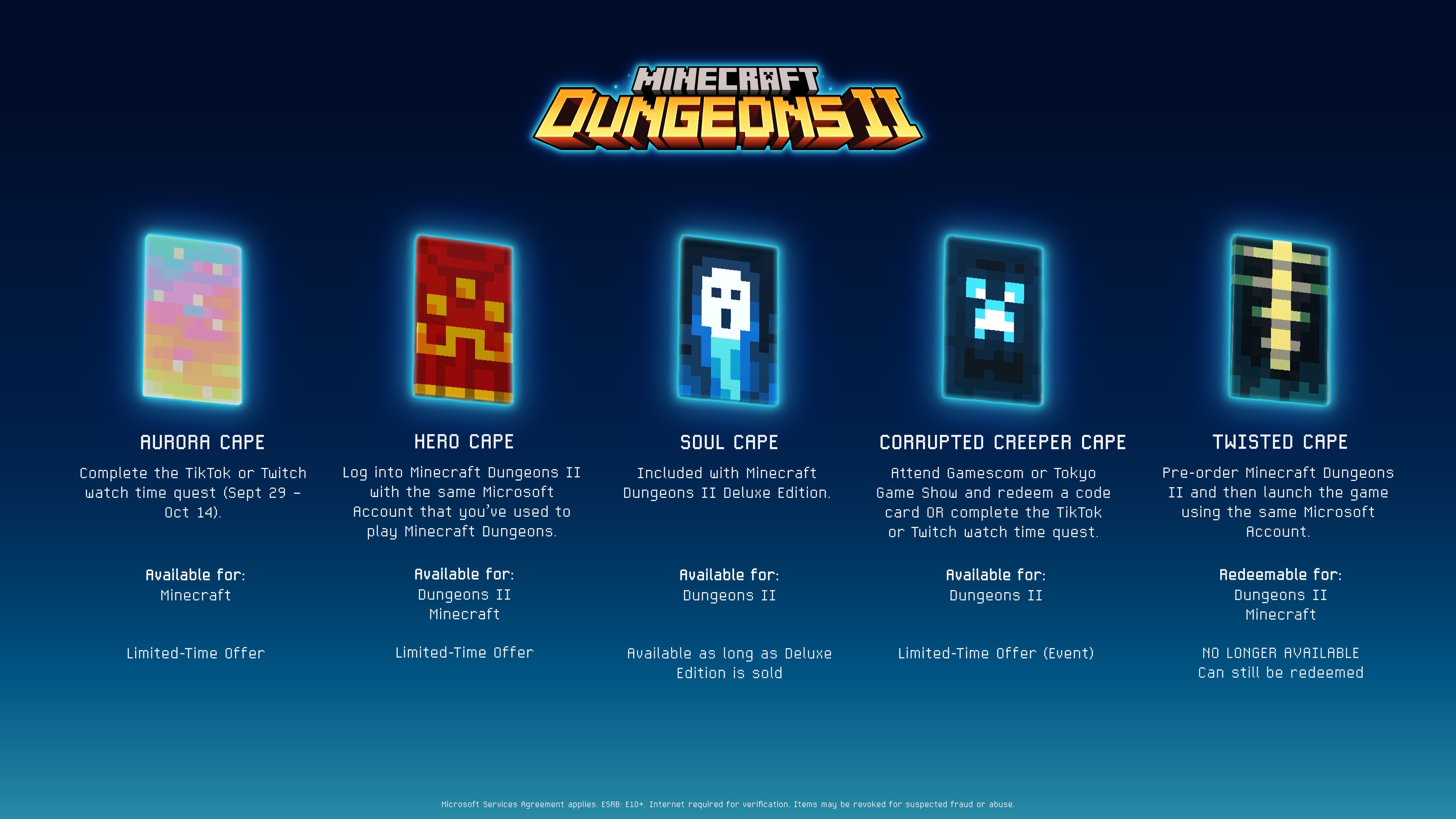
Minecraft redeem means the minecraft.net/redeem page: you enter a code, log in with your Microsoft account, and the cape lands on your account. In Java Edition you pick it in the launcher, and in Bedrock in the Dressing Room menu. You can get the Aurora Cape by watching Dungeons II streams until October 14, and you can enter the code until October 31, 2026 (as of October 7, 2026).
Minecraft redeem step by step at minecraft.net/redeem
The page walks you through 4 steps. For capes, step 2 is the most important: you log in with the same Microsoft account you play on.
- Enter the 5x5 code, meaning 25 characters in 5 groups of 5. You'll find it on a card, a receipt or in an email.
- Log in with an active Microsoft account. If you don't have one, you can create it for free.
- Confirm the content the code will add to your account.
- Done: the new item is already waiting on your account.
The same form also accepts other codes:
- Minecraft: Java & Bedrock Edition cards for PC,
- Realms Plus cards (you activate the Realm by logging in to Bedrock on Xbox or Windows),
- Minecraft Dungeons and Minecraft Legends cards,
- Mattel codes for Character Creator items, included with Minecraft products,
- cape codes from the Minecraft Experience: Villager Rescue event, which you get for taking part in it.
There are also 2 exceptions. If your Minecoins code has 10 characters, enter it at xbox.codetocontent.com. If you have a Java Edition-only gift card bought before December 1, 2020, contact Minecraft Player Care. If you want to give someone the game itself as a gift, see how the Minecraft: Java & Bedrock code as a gift works.
Twitch and TikTok codes: a cape for watching
Watch-to-earn promotions usually follow the same pattern: you watch the designated streams for the required time, the platform sends you a code, and you enter it at minecraft.net/redeem.
For the Aurora Cape, any Minecraft Dungeons II stream with rewards enabled counts. On TikTok, 3 minutes of watching is enough, while on Twitch you need at least 15 minutes. Minutes only count during a live stream, so watching a replay won't do anything. The code arrives in your Twitch Inventory or in your TikTok notifications.
Dates (as of October 7, 2026): the promotion started on September 29, and watching ends on October 14 at 11:59 PM Pacific Time, which is the morning of October 15 in Poland. You can enter the code at minecraft.net/redeem until October 31, 2026. There's a limit of 1 code per person and Microsoft account, the pool of codes is limited, and you can't pass the code on to anyone else.
The Aurora Cape only works in regular Minecraft, meaning Java Edition and Bedrock Edition, so you need one of those versions to claim it. You can't equip it in Dungeons II itself. The codes are sent out by the streaming platform, not Microsoft. If your minutes add up and the code never showed up, contact Twitch or TikTok support.
Don't confuse this promotion with the earlier WatchTime Quest event for the Corrupted Creeper Cape, which ran from September 21 to 26. As we wrote in the news about the September Minecraft Live, the code from that promotion is entered in Dungeons II itself, not on minecraft.net.
Aurora, Hero and Twisted: deadlines for the Dungeons II launch capes
Here are the deadlines for the capes tied to the Dungeons II launch, as of October 7, 2026. We described each of them in detail in our article on all the capes from Minecraft Dungeons II.
| Cape | How to get it | Deadline | Where to claim it |
|---|---|---|---|
| Aurora Cape | Dungeons II streams: 3 minutes on TikTok or 15 minutes on Twitch | Watch until October 14, enter the code by October 31, 2026 | minecraft.net/redeem, then Java and Bedrock |
| Hero Cape | Playing the original Minecraft Dungeons | Log in to Dungeons II before December 31, 2026 | No code: Dungeons II, then Java and Bedrock |
| Twisted Cape | Dungeons II pre-order | Pre-order has ended, claiming still works | No code: Dungeons II, then Java and Bedrock |
The Soul Cape from the Deluxe edition and the Corrupted Creeper Cape from events and promotions stay in Dungeons II, so you can't equip them in regular Minecraft.
The Hero Cape doesn't require a code, and neither does the Twisted Cape from the digital pre-order. For the Hero Cape, what counts is having played the original Minecraft Dungeons, including through Game Pass or on Steam. Then you launch Dungeons II on the same Microsoft account within the deadline from the table. For the Twisted Cape, you log in to the game with your Microsoft account and confirm the claim of your pre-order items.
Once the cape shows up in Dungeons II, log in to Java or Bedrock on the same account and it will unlock there too. A code from a boxed pre-order is entered in your platform's store, not on minecraft.net: at xbox.com/redeem, ec.nintendo.com/redeem or in the PlayStation Store (profile, then Redeem Codes). From there you proceed as with the digital version.
How to equip a cape in Java and Bedrock Edition
Java Edition
Open the Minecraft Launcher, choose Minecraft: Java Edition from the menu on the left and go to the Skins tab, between Installations and Patch Notes. Edit your skin, pick a cape and save the changes.
You set the cape separately for each skin. If you switch between several, assign it to every one you want to wear it with.
Bedrock Edition
On the start screen, go to the Dressing Room and choose a cape. You can put it on your own skin, a Marketplace skin, a default skin or a Character Creator character.
You'll find more about changing your character's look in our guide on how to change your skin in Minecraft. Capes from the Essential mod work in its own separate system.
Cape not showing up? Check these in order
- Make sure you're entering the code on the same Microsoft account you use to log in to the games.
- Give the system a moment. For the Common Cape in 2025, Mojang wrote in its FAQ that syncing during peak hours can take up to 15 minutes. Then restart the game, since a restart refreshes your inventory.
- Unlocking the Hero Cape requires an internet connection, because the system has to confirm that you played. The confirmation can be delayed, and if you run into trouble, contact customer support.
- Check whether the promotion and the time to enter the code are still running.
- For the Aurora Cape, there's a limit of 1 code per person and Microsoft account.
- The Aurora Cape promotion's rules may include geographic and country restrictions.
- If your Aurora Cape code never arrived at all, report it to Twitch or TikTok, since the platforms are responsible for sending it.
Aurora Cape codes are non-transferable, and Microsoft reserves the right to remove redeemed codes and suspend or ban the account if it suspects fraud or abuse. So don't buy cape codes from other people and don't use "code generators". You risk losing the cape, or even getting your account banned.
How earlier cape promotions worked
In recent years, cape promotions have come back every few months. The reward was usually a 5x5 code with an expiration date, but some capes landed on your account without a code. We cover the older capes from the base game in our wiki: types of capes in Minecraft.
- A Minecraft Movie (March 2025): the Home and Menace capes for at least 3 minutes of watching a Minecraft content creator, on Twitch and TikTok respectively. The 5x5 code had to be redeemed by April 6, 2025. The Yearn cape was awarded for challenges in a live event in Bedrock.
- Common Cape (May 2025): no code. All you had to do was log in with a Microsoft account in Bedrock Edition, and the cape worked in Java Edition too. The promotion ran until May 5, 2026.
- Copper Cape (October 2025): on TikTok, 3 minutes of Minecraft on a Game Reward stream were enough, and on Twitch at least 5 minutes with a partner or affiliate in the Minecraft category. The code had to be entered by November 19, 2025. In Bedrock, placing a Copper Golem Statue also earned you the cape.
- Crafter Cape (TwitchCon in Rotterdam, May 2026): for 3 Emerald stickers, collected at the Minecraft attractions on site, you got a card with a code. The code had to be entered at minecraft.net/redeem by June 30, 2026, and the cape then showed up in the Dressing Room.
Sources
- Redeem Minecraft Codes, Gift Cards, and Prepaid Cards (minecraft.net)
- Minecraft Dungeons II Capes & Promos (minecraft.net)
- About Dungeons II, FAQ (minecraft.net)
- What is a Minecraft Skin? (minecraft.net)
- New cape alert (minecraft.net)
- A Minecraft Movie Live Event (minecraft.net)
- The Copper Cape Quest is almost over (minecraft.net)
- Join Minecraft at TwitchCon (minecraft.net)
- Jak zrealizować kod kuponu z PlayStation Store (playstation.com)